What to Do Before Recycling Your Old Phone or Laptop (Data Wiping Guide)
Before you recycle your old phone or laptop, it’s essential to properly wipe your personal data. A simple delete or factory reset is not always enough to fully protect your privacy. From photos and passwords to banking apps and personal files, your devices store a lot more information than you might think.
If you’re planning to dispose of your device responsibly, professional services like electronic waste disposal can ensure your old electronics are handled safely, securely, and in an environmentally friendly way.
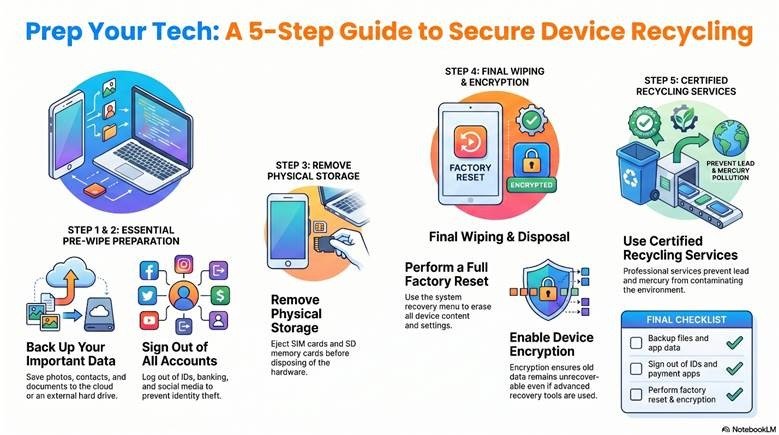
Below is a complete step-by-step guide to help you prepare your device before recycling.
📱 Step 1: Back Up Your Important Data
Before wiping anything, make sure you save everything you still need.
✔ What to back up:
- Photos and videos
- Contacts
- Important documents
- App data (where possible)
- Messages and chat history
- Browser bookmarks
💾 Backup options:
| Device | Recommended Backup Method |
| iPhone | iCloud or iTunes/Finder |
| Android | Google Drive |
| Windows Laptop | OneDrive or external hard drive |
| MacBook | Time Machine or iCloud |
👉 Always double-check your backup before moving on.
🔐 Step 2: Sign Out of All Accounts
This step is crucial for protecting your identity.
Make sure you sign out of:
- Apple ID or Google account
- Email accounts (Gmail, Outlook, etc.)
- Social media apps
- Banking and payment apps (PayPal, Apple Pay, Google Pay)
💡 Tip: On Apple devices, failing to sign out can trigger Activation Lock, making the device unusable for others.
💳 Step 3: Remove SIM Cards and External Storage
Before recycling:
- Remove your SIM card
- Take out any SD or memory cards
- Check for hidden storage accessories
These often contain personal data or are linked to your mobile number.
🔄 Step 4: Perform a Full Factory Reset
This is the most important step, but it must be done correctly.
📱 iPhone:
Settings → General → Transfer or Reset iPhone → Erase All Content and Settings
🤖 Android:
Settings → System → Reset → Factory Data Reset
💻 Windows:
Settings → System → Recovery → Reset this PC
🍎 MacBook:
Use Recovery Mode → Disk Utility → Erase → Reinstall macOS
🔒 Step 5: Turn On Encryption (If Not Already Enabled)
Encryption protects your data even before deletion.
| Device | Encryption Feature |
| iPhone | Enabled by default |
| Android | Device encryption (varies by model) |
| Windows | BitLocker |
| Mac | FileVault |
💡 With encryption enabled, even advanced recovery tools can’t retrieve your old data.
Why Proper Data Wiping Matters
Simply deleting files isn’t enough. Without proper wiping, sensitive data can still be recovered.
Proper preparation helps you:
- Prevent identity theft
- Protect financial information
- Secure personal photos and messages
- Reduce cybersecurity risks
It also ensures your device is ready for safe recycling.
Responsible Recycling in Australia
Electronic waste is one of the fastest-growing waste streams in Australia. Improper disposal can release harmful substances like lead and mercury into the environment.
Recycling through certified services helps:
- Recover valuable materials
- Reduce landfill waste
- Protect the environment
- Support a circular economy
Final Step: Recycle Through a Trusted Service
Once your device is fully wiped and ready, the next step is responsible recycling. Choosing a professional service ensures your electronics are processed safely and sustainably.
You can learn more about the company and its sustainability approach on the official website:
👉 RubbishGO